
High-Density MOXA NPORT 5610-8-DT/EU V1.5.1 Eight-Port RS-232 Device Server for Structured Serial-to-Ethernet Migration and Remote Operations
 August
19, 2026
August
19, 2026
Planning a Reliable Serial Modernization with the MOXA NPORT 5610-8-DT/EU V1.5.1: Port Mapping, Network Design and Commissioning Control
The MOXA NPORT 5610-8-DT/EU V1.5.1 provides a focused way to bring multiple RS-232 devices onto an Ethernet network without replacing the serial equipment that still performs a useful production role. With eight DB9 male serial ports, two 10/100BaseT(X) Ethernet ports and a desktop metal housing, this configuration can consolidate scattered controllers, meters, terminals, barcode readers or laboratory instruments into a manageable network endpoint.
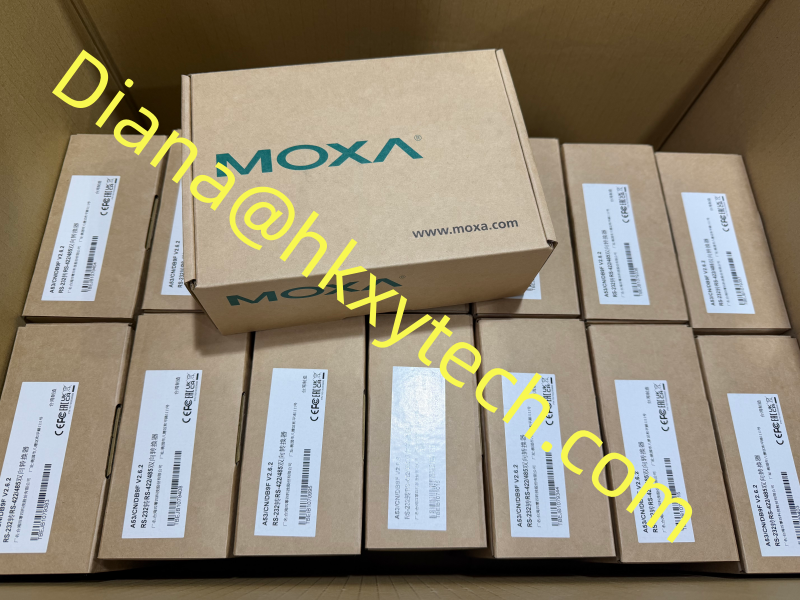
Image note: this existing website image is a MOXA inventory and brand reference. Confirm the complete label on the delivered MOXA NPORT 5610-8-DT/EU V1.5.1 before installation.
The Project Problem It Solves
Many facilities have dependable serial assets but no practical way to place them near the computers or applications that need their data. Long RS-232 cable runs introduce distance and maintenance problems, while replacing every endpoint can create unnecessary engineering risk. The MOXA NPORT 5610-8-DT/EU V1.5.1 moves the network boundary closer to those devices, allowing Ethernet to carry communications between the server and host environment.
This is not simply a cabling change. A successful migration must preserve baud rate, data bits, stop bits, parity, flow control and application timing for every channel. The MOXA NPORT 5610-8-DT/EU V1.5.1 should therefore be introduced through a port-by-port plan rather than connected to eight devices at once without a baseline.
Build an Eight-Port Inventory First
Create one record for each intended serial connection. List the device name, physical location, existing COM port, DB9 pin use, DTE or DCE behavior, baud rate, framing, flow control, polling interval and host application. Note whether the cable is straight-through, null-modem or custom wired. This inventory gives the commissioning team a reference when mapping channels on the MOXA NPORT 5610-8-DT/EU V1.5.1.
Confirm that every endpoint is RS-232. The NPort 5610-8-DT model is not the RS-422/485 version of the family.
Check whether the application needs modem-control signals such as RTS, CTS, DTR, DSR or DCD.
Record the original response time and retry behavior before moving the connection to Ethernet.
Give each physical port a permanent asset name instead of relying only on port numbers.
Keep one unused test cable and a verified loopback connector with the project documentation.
Choose the Operating Mode Around the Application
For software that must continue opening a familiar COM port, the Windows Real COM or Linux Real TTY approach can reduce application changes. Other architectures may use TCP server, TCP client or UDP modes, depending on which endpoint initiates communication and how sessions are managed. The correct choice for the MOXA NPORT 5610-8-DT/EU V1.5.1 depends on the application, not on a generic preference for one protocol.
Define what should happen after a host restart, Ethernet interruption or serial-device power cycle. Decide whether a session should reconnect automatically, how long inactive connections remain open and how the application identifies stale data. Test these behaviors deliberately. A link that passes data during normal operation can still fail an operational acceptance test if recovery is not predictable.
Use the Two Ethernet Ports with a Documented Purpose
Moxa specifies two 10/100BaseT(X) RJ45 Ethernet ports with built-in 1.5 kV magnetic isolation for this model. In a project using the MOXA NPORT 5610-8-DT/EU V1.5.1, the two connections should follow the supported topology and site network design. Do not assume that two ports automatically create every form of redundancy. Confirm the intended connection method, switch configuration, spanning-tree behavior and failure response before connecting both ports.
Assign a reserved address or a controlled DHCP reservation, then record the subnet, gateway, DNS requirement and management VLAN. Place the MOXA NPORT 5610-8-DT/EU V1.5.1 on the smallest practical network segment and allow only the management and data flows needed by approved hosts. Clear device naming and switch-port labeling will save significant troubleshooting time later.
Power, Mounting and Environmental Review
The official specification lists 12 to 48 VDC input, two power-input methods through terminal block and power jack, and reverse-polarity protection. Confirm the supplied regional power accessory associated with the /EU package rather than treating the suffix as an electrical specification by itself. If the MOXA NPORT 5610-8-DT/EU V1.5.1 is powered from a control supply, document protection, isolation, grounding and the effect of a single supply failure.
The standard NPort 5610-8-DT operating range is 0 to 55 degrees C. Keep ventilation clear and do not place the desktop unit directly above a strong heat source. Moxa lists desktop installation plus optional DIN-rail or wall-mounting arrangements. Select the method that protects serial connectors and prevents cable weight from pulling on the MOXA NPORT 5610-8-DT/EU V1.5.1.
A Security Baseline for Serial Data
Serial equipment often predates modern security controls, so the device server becomes an important boundary. Change default credentials, use HTTPS for management where supported, restrict management access and disable services that the project does not require. Moxa lists TLS 1.2 HTTPS and SNMPv3 among the supported security functions for the current product specification. Match settings to the approved firmware baseline on the MOXA NPORT 5610-8-DT/EU V1.5.1.
The V1.5.1 designation should be recorded as the supplied version baseline. Before any upgrade, review Moxa release notes, backup the configuration and verify compatibility with drivers and management tools. Do not change firmware during commissioning merely because a newer package exists. The risk assessment should balance security corrections, feature needs, regression testing and the ability to restore the MOXA NPORT 5610-8-DT/EU V1.5.1.
Commission One Channel, Then Scale
Inspect the package, verify the MOXA NPORT 5610-8-DT/EU V1.5.1 label and record MAC address, serial number and version.
Power the unit on an isolated commissioning bench and establish secure management access.
Configure one serial port using the documented settings and prove local device communication.
Introduce the production host, measure response time and test application restart and cable interruption.
Clone only the settings that are truly common, then commission the remaining seven ports individually.
Test simultaneous traffic so one noisy or unresponsive device does not conceal problems on other channels.
During acceptance, prove normal data exchange, incorrect-password handling, loss of Ethernet, loss of serial-device power and recovery after reboot. Save screenshots or exports of the final port mapping. A controlled test record turns the MOXA NPORT 5610-8-DT/EU V1.5.1 from an undocumented converter into a maintainable part of the plant network.
Lifecycle Records That Future Technicians Need
The handover package should include the full model, firmware baseline, IP information, switch ports, serial settings, cable drawings, application owners, driver versions, configuration backup and restoration steps. Add a simple dependency list showing which production function uses each of the eight ports. When the MOXA NPORT 5610-8-DT/EU V1.5.1 requires maintenance, this record prevents one port change from unexpectedly affecting several systems.
The main advantage of the MOXA NPORT 5610-8-DT/EU V1.5.1 is disciplined consolidation: eight RS-232 channels can share a managed Ethernet connection while the original field devices remain in service. The best result comes from accurate serial discovery, deliberate network design, secure configuration and staged acceptance testing. With those controls in place, the MOXA NPORT 5610-8-DT/EU V1.5.1 can support a practical modernization path without turning legacy communication into an invisible operational risk.