
Compact MOXA EDS-208A V2.1.0 8-Port Industrial Ethernet Switch for Dependable Machine and Control Networks
 August
07, 2026
August
07, 2026
Deploying the MOXA EDS-208A V2.1.0 in Industrial Ethernet Networks: A Practical Guide to Topology, Power, Installation and Troubleshooting
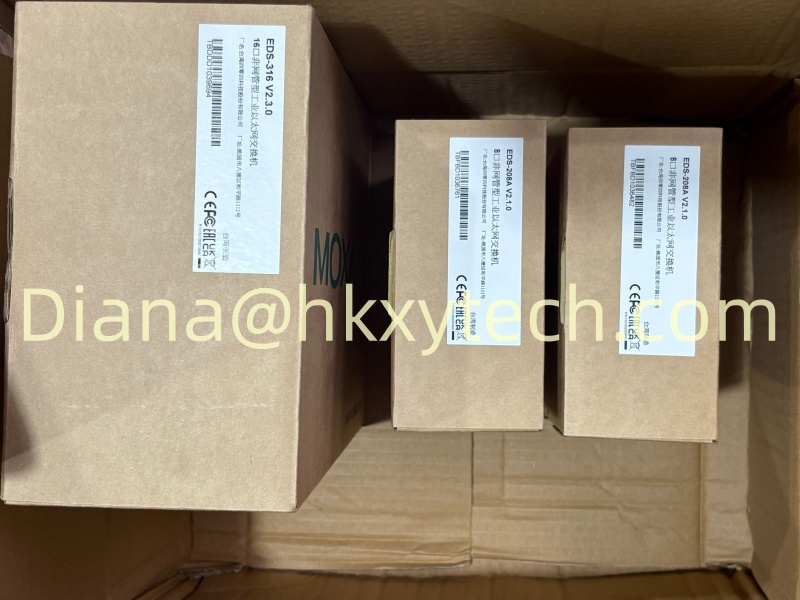
The MOXA EDS-208A V2.1.0 is identified in the supplied product record as an EDS-208A industrial Ethernet switch. The standard EDS-208A provides eight 10/100BaseT(X) RJ45 ports in an unmanaged, DIN-rail-mountable design. It is a practical choice for machine panels and distributed control cabinets that need straightforward Ethernet connectivity without the configuration workload of a managed switch.
Because the MOXA EDS-208A V2.1.0 is based on an unmanaged switching approach, deployment is generally simple: connect power, attach Ethernet devices and verify link activity. Simplicity does not remove the need for engineering discipline. Port allocation, power redundancy, cable routing, grounding and network boundaries should still be planned so that the MOXA EDS-208A V2.1.0 supports reliable operation and remains easy to troubleshoot.
Core Hardware Characteristics
| Parameter | EDS-208A Series Reference |
| Ethernet ports | 8 x 10/100BaseT(X) RJ45 on the standard EDS-208A |
| Port behavior | Auto negotiation, full/half duplex and Auto MDI/MDI-X |
| Input power | 12/24/48 VDC redundant dual inputs; 9.6 to 60 VDC operating range |
| Protection | Overload current and reverse-polarity protection supported |
| Housing and rating | Aluminum housing, IP30 |
| Dimensions | 50 x 114 x 70 mm |
| Standard temperature range | -10 to 60 degrees C; verify suffix for wide-temperature versions |
Where an Unmanaged Switch Fits Best
The MOXA EDS-208A V2.1.0 is well suited to compact cells where network behavior is already defined by the connected controllers and devices. Typical connections may include a PLC, operator panel, remote I/O, drive, vision device, maintenance port and uplink. Assigning these connections on a drawing before installation makes the MOXA EDS-208A V2.1.0 easier to commission and reduces cable confusion during service.
An unmanaged switch does not provide the monitoring, VLAN or loop-control functions associated with managed infrastructure. Therefore, the MOXA EDS-208A V2.1.0 should be used in a topology where accidental loops are prevented by design. If a project requires network redundancy, traffic segmentation, port diagnostics or remote configuration, engineers should evaluate a suitable managed Moxa model instead of expecting those functions from the MOXA EDS-208A V2.1.0.
Power and Panel Installation
The EDS-208A platform supports redundant dual DC inputs, allowing the MOXA EDS-208A V2.1.0 to be connected to two appropriate live power sources when the panel design requires improved supply continuity. The sources, fusing and conductor sizes must comply with the installation guide and local standards. Before energizing the MOXA EDS-208A V2.1.0, verify polarity, terminal security and protective grounding.
Install the MOXA EDS-208A V2.1.0 on a secure DIN rail with space for cable bends and ventilation. Keep Ethernet wiring away from high-energy switching conductors where practical, cross power cables at right angles when separation is limited, and use industrial cabling appropriate for the electrical environment. The IP30 aluminum housing is intended for installation within a suitable cabinet; environmental protection for the overall assembly remains the responsibility of the panel design.
Commissioning the Eight-Port Network
Bring the network online in stages. Power the MOXA EDS-208A V2.1.0 first, then connect one endpoint at a time while checking link indicators and device communication. Confirm that each endpoint has the correct address and subnet settings. Auto negotiation and Auto MDI/MDI-X simplify cabling, but basic checks should still include connector condition, cable continuity and compatible speed or duplex behavior.
Broadcast storm protection can be controlled by DIP switch on the EDS-208A platform. The project engineer should set this feature according to the approved network design and record the final position. A photograph of the installed MOXA EDS-208A V2.1.0, labeled port schedule and power-terminal record can save considerable time during later maintenance.
Fast Troubleshooting Without Management Software
If communication is lost, start at the physical layer. Check power to the MOXA EDS-208A V2.1.0, observe the link indicator for the affected port, inspect the patch lead and test the endpoint on a known working connection. Determine whether the failure follows the cable, endpoint or port. This orderly process is more reliable than changing several components at once.
For intermittent faults, review cabinet temperature, vibration, connector strain and nearby sources of electrical noise. Verify that the MOXA EDS-208A V2.1.0 is not part of an unintended Ethernet loop and that connected equipment is not generating excessive broadcast traffic. Keeping a spare tested cable and a documented port map beside the panel helps technicians isolate the problem quickly.
Ordering and Version Verification
The text "V2.1.0" in MOXA EDS-208A V2.1.0 may represent a supplied label or version reference rather than a unique hardware ordering suffix. Before purchase, compare the complete product label, port configuration, operating-temperature requirement and certifications with the current Moxa documentation. This verification ensures that the delivered MOXA EDS-208A V2.1.0 matches the intended cabinet and application.
With a clean topology, redundant power planning and clear documentation, the MOXA EDS-208A V2.1.0 can provide compact and dependable connectivity for industrial endpoints. Its value lies in straightforward deployment, rugged construction and eight-port access. Used within the correct network architecture, the MOXA EDS-208A V2.1.0 offers a practical foundation for machine-level Ethernet communication.